Urban Model Scene Layout Design
Introduction
A great urban model is more than a collection of buildings.
It is a carefully composed scene that tells a story.
Every road, every park, every glass tower has a purpose.
The layout guides the viewer’s eye and communicates the master plan.
That is the art ofUrban Model Scene Layout Design.
This guide explains the principles of effective scene composition.
How to balance built and natural elements.
And how to integrate advanced features like transparent glass and water landscapes.
Let us begin.
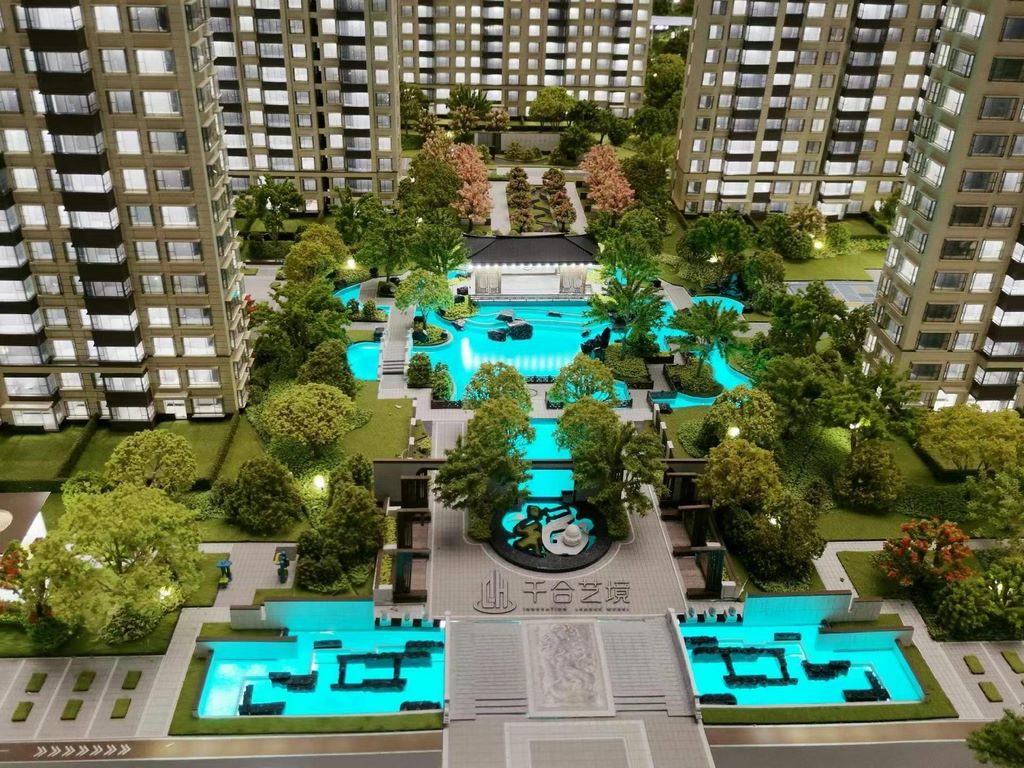
The Foundation – Zoning and Hierarchy
Every urban model starts with a clear land‑use plan.
Define Zones
Residential areas– Warm colors, lower heights, clustered around parks.
Commercial districts– Dense, tall buildings, often near transit hubs.
Industrial zones– Separated by green buffers, located near transport corridors.
Public spaces– Parks, plazas, and civic buildings as focal points.
For aTransparent Glass Building Sand Model, commercial districts are the ideal place to showcase curtain‑wall towers.
Their reflective facades become landmarks that anchor the composition.
Establish Visual Hierarchy
The tallest or most iconic building should draw the eye.
Supporting structures should be lower, creating a skyline that rises toward the center or along a major boulevard.
InUrban Model Scene Layout Design, a golden ratio or rule‑of‑thirds composition creates natural viewing paths.
Circulation – Roads, Paths, and Transit
A city without roads is a collection of islands.
Primary Arteries
Wide, dark‑grey roads with clear lane markings.
They should connect the main districts and lead to the model’s edges (suggesting connections beyond).
Secondary Streets
Narrower, with less prominent markings.
They create block structure and pedestrian‑scale routes.
Pedestrian Paths
Lighter coloured or textured walkways that weave through parks and plazas.
They add human scale and show how people move between buildings.
IntegrateModel Landscape Tree And Road Customelements to ensure road surfaces have realistic asphalt texture and lane markings.
Smooth, polished road edges come from theArchitectural Model Surface Polishing Process, which removes rough laser‑cut edges and gives a professional finish.
Building Placement – Massing and Spacing
Avoid a uniform “grid of blocks” look.
Vary Building Heights
Group tall towers in commercial cores.
Step down heights toward residential edges.
This creates a natural skyline silhouette.
Maintain Setbacks
Leave space between buildings for light, air, and pedestrian flow.
In real cities, towers have plazas; models should reflect that.
Orientation for Views
Angle key buildings so their most interesting facades face the main viewing angle.
Glass buildings should reflect light toward the viewer.
Natural Elements – Parks and Water Features
Parks and Open Space
Place parks where they serve the most residents: near residential clusters, along waterfronts, or as buffers between zones.
Use multiple shades of green flocking for depth.
Water Features
ASimulation Water Landscape Sand Table Modelbrings rivers, lakes, and coastlines to life.
Position water to:
Frame the model (a river along one edge).
Create a focal point (a central lake with a fountain).
Separate zones (a canal between industrial and residential areas).
Epoxy resin water with subtle blue tint and LED backlighting creates the most realistic effect.
Reflections from nearby glass buildings enhance the illusion.
Lighting and Visual Emphasis
LED lighting guides the viewer’s attention.
Warm white– Residential areas, parks (inviting).
Cool white– Commercial cores, transit hubs (energetic).
Blue– Water features, transit lines (technical).
Programmable sequences– Show phasing or traffic flow.
For aTransparent Glass Building Sand Model, backlit acrylic curtain walls create a stunning night‑time skyline.
The glow from within makes the glass appear alive.
Foreground, Midground, Background
A well‑composed scene has depth.
Foreground
The closest edge to the viewer.
Use low elements: plazas, street trees, miniature figures.
Avoid tall buildings that block the view.
Midground
The main action.
Where most buildings, roads, and parks sit.
This is where the core story unfolds.
Background
The far edge of the model.
Use taller buildings as a backdrop, but keep them slightly lower than midground focal points.
Gradual height increase toward the center creates perspective.
Adding Life – Miniature Figures and Vehicles
A city without people feels abandoned.
Miniature Figure For Sand Table Modelfigures placed at crosswalks, park benches, and building entrances add scale and activity.
Group figures naturally – families in parks, commuters at transit stops, shoppers along retail streets.
Unpainted white figures provide scale without distracting from architecture.
Vehicles (cars, buses, trucks) on roads show traffic flow.
Place them sparsely – too many clutter the scene.
Protective Measures for Long‑Term Display
Once your scene is perfectly arranged, protect it.
ACustom Protective Case For Sand Table Modelmade from UV‑blocking acrylic keeps dust off and prevents fading.
It also protects delicate details from accidental touches.
For models displayed in bright lobbies or near windows, UV protection is essential to preserve paint and resin colours.
Anti‑Aging Maintenance for Lasting Beauty
Even with a protective case, models require periodic care.
Sand Table Model Anti Aging Maintenanceincludes:
Annual inspection for loose parts or fading.
Re‑sealing painted surfaces with UV‑stable clear coat.
Polishing acrylic windows to restore clarity.
Checking resin water for yellowing or cracks.
A well‑maintained model can look new for 10–15 years.
Case Study: Mixed‑Use District Model
A developer created a 1:200 scale model of a 20‑block mixed‑use district.
Urban Model Scene Layout Designprinciples applied:
Commercial core at the center with 6 glass towers.
Residential clusters at the edges with lower buildings.
A river winding through the model, with parks along both banks.
A light rail line connecting the district to the model’s edge.
TheTransparent Glass Building Sand Modeltowers used backlit cast acrylic for curtain walls.
TheSimulation Water Landscape Sand Table Modelriver used three‑layer epoxy resin with fiber optic ripples.
ACustom Protective Case For Sand Table Modelwith UV‑blocking acrylic kept the model pristine in the sales center.
AnnualSand Table Model Anti Aging Maintenanceincluded repolishing the acrylic towers and resealing the water feature.
The model helped pre‑lease 70% of retail space before construction.
Common Layout Mistakes
Overcrowding– Too many buildings make the scene chaotic. Leave breathing room.
Flat skyline– Vary building heights; avoid all structures at the same level.
Ignoring views– Place the most impressive elements where they will be seen first.
Forgetting scale– Use miniature figures to remind viewers of human proportions.
Poor lighting– Uneven or harsh lighting washes out details.
Conclusion
Urban Model Scene Layout Designis both science and art.
Balance zoning, circulation, and visual hierarchy.
UseTransparent Glass Building Sand Modeltechniques to highlight modern architecture.
IntegrateSimulation Water Landscape Sand Table Modelfeatures for natural focal points.
Protect your work with aCustom Protective Case For Sand Table Modeland maintain it throughSand Table Model Anti Aging Maintenance.
Apply theArchitectural Model Surface Polishing Processto acrylic edges and glossy finishes for a professional, high‑end appearance.
Whether you are planning a downtown redevelopment, a university campus, or a resort community, thoughtful scene layout transforms a collection of parts into a compelling story.
Contact a professional model maker today.
Bring your urban vision to life.
Ready to design an urban model scene? Request a consultation with your master plan files. Get a response within 48 hours.


