City Overall Layout Sand Table Model
Introduction
A city is a complex machine.
Land use, roads, utilities, parks, public facilities – all must work together.
But how do you see the entire system at once?
Digital screens show only fragments.
You need a physical model.
That model is a City Overall Layout Sand Table Model.
This guide explains why the big picture matters.
What features to include.
And how to use this model for strategic planning.
Let us begin.
What Is a City Overall Layout Sand Table Model?
It is a physical miniature of a city’s complete spatial structure.
Built on a sand‑textured base.
A City Overall Layout Sand Table Model shows land use zones, road networks, transit corridors, open spaces, water bodies, and major public facilities.
Unlike a sector‑specific model, this one is the master view.
It helps leaders understand how all pieces fit together.
The model is used by mayors, city planners, and development agencies.
Why a City‑Wide Layout Model Matters
Strategic decisions need a strategic view.
A City Overall Layout Sand Table Model provides that view.
Council members see how a new highway affects a residential neighborhood.
Planners identify conflicts between industrial zones and parkland.
Also, the model supports public communication.
Citizens grasp the city’s growth direction.
For cross‑departmental alignment, transportation, housing, and environment teams share one reference.
Key Features of a City Overall Layout Sand Table Model
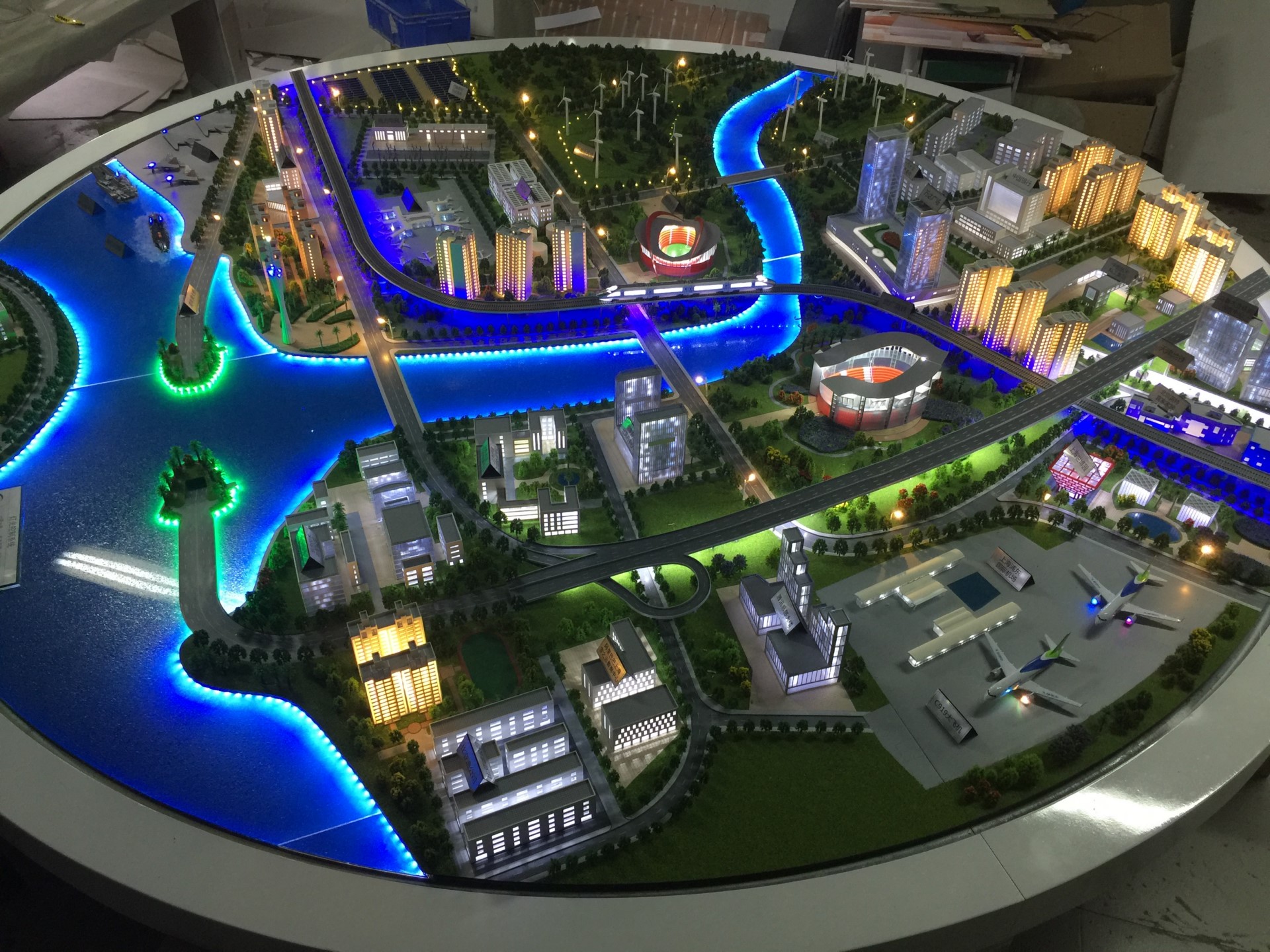
Let us break down what makes a comprehensive layout model.
Land Use Zoning
Residential (yellow), commercial (red), industrial (blue), mixed‑use (orange), open space (green), institutional (purple).
Standardized colors with a legend.
Transportation Networks
Arterial roads, collectors, local streets.
Transit lines (bus, rail, BRT).
Bike lanes and pedestrian paths.
Water Bodies and Topography
Rivers, lakes, coastlines.
Major hills shown with contour shading.
Green and Open Space
Parks, greenways, urban forests, agricultural buffers.
Major Public Facilities
Hospitals, schools, universities, fire stations, police headquarters, government centers.
Referenced in a Public Facility Planning Scale Model at a detailed level.
Growth Boundaries and Phasing
Urban growth boundary.
Phase 1, 2, and future expansion areas.
Infrastructure Corridors
Power lines, water mains, sewer trunks (simplified).
Interactivity
Removable zoning overlays for scenario testing.
LEDs to highlight transit corridors.
A well‑crafted City Overall Layout Sand Table Model answers: “Is this city balanced, compact, and ready for the future?”
Materials for City Layout Models
Layout models emphasize readability over architectural detail.
Laser‑cut MDF or acrylic – For building massing blocks.
Colored acrylic sheets – For land use zones.
Fine sand or textured paint – For ground.
Blue resin – For water bodies.
Printed vinyl – For labels, roads, and boundaries.
Thin colored rods – For transit lines.
Transparent overlays – For phasing and growth scenarios.
LEDs – For key corridors (optional).
Avoid excessive detail – focus on patterns and relationships.
The Custom Production Process: Step by Step
How is a city overall layout sand table model made?
Here is the typical workflow.
Step 1: Comprehensive Data Compilation
You provide land use maps, transportation plans, infrastructure master plans, environmental data, and growth projections.
The model maker integrates all layers.
Step 2: Scale Selection
Common scales: 1:5,000 to 1:20,000.
1:5,000 for a medium‑sized city.
1:10,000 for a large metropolitan area.
Step 3: Base and Topography
A reinforced base is cut.
Major rivers and hills sculpted.
Step 4: Land Use Zoning
Color‑coded zones applied.
Step 5: Transportation Networks
Road hierarchies and transit lines added.
Step 6: Water and Green Space
Resin for water, green flocking for parks.
Step 7: Major Public Facilities
Icons for hospitals, schools, government centers.
Step 8: Growth Boundaries and Phasing
Urban growth boundary as a bold line.
Phase 1, 2, 3 distinguished.
Step 9: Infrastructure Corridors
Simplified utility lines (optional overlay).
Step 10: Interactivity
Removable zoning overlays for scenario testing.
Step 11: Quality Control and Cover
The model is inspected for legibility.
A low acrylic railing or full cover is added.
A custom City Overall Layout Sand Table Model typically takes 10 to 14 weeks.
Applications for City Layout Models
Where are these models used?
Strategic Master Planning
Guide long‑term growth and investment.
Council and Stakeholder Presentations
Show the big picture to elected officials.
Cross‑Departmental Coordination
Align housing, transport, environment, and infrastructure.
Public Outreach and Visioning
Citizens understand the city’s future direction.
Grant and Funding Applications
Demonstrate integrated planning to state agencies.
Integration with Other Planning Models
An Urban Traffic Planning Sand Table Model adds detailed intersection and congestion analysis – your layout model shows the network context.
Case Study: Layout Model Unlocks Regional Transit Funding
A city of 400,000 had a fragmented master plan.
State funding for a light rail line required a clear vision of land use and transit integration.
They commissioned a City Overall Layout Sand Table Model at 1:8,000 scale, covering a 3m x 2.5m table.
The model showed the proposed light rail line (blue LED strip) passing through mixed‑use zones (orange).
State reviewers walked around the model.
They saw how the line connected job centers to housing.
Funding was approved – $1.2 billion.
The model cost $65,000.
Cost Factors for City Layout Models
Area covered – 100 sq km vs. 1,000 sq km.
Scale – 1:5,000 (more detail) costs more than 1:20,000.
Number of layers – 5 vs. 12.
Phasing complexity – 2 phases vs. 5 phases.
Interactivity – Static vs. overlays and LEDs.
Typical range: 130,000 for a large metropolitan model with multiple scenario overlays.
How to Choose a Model Maker for City Layout Projects
Experience with comprehensive city models – Not just districts.
Ability to simplify without losing meaning – Readability is key.
Understanding of planning standards – Land use colors, growth boundaries.
References from city planning departments – Call two.
Ask for a sample of a city‑wide layout model showing land use and transport together.
Maintaining and Updating Your Layout Model
City plans evolve over decades.
Use removable zoning overlays – Update land use as plans change.
Replaceable growth boundary stickers – Adjust when boundaries shift.
Annual review – Compare to current comprehensive plan.
Budget for major update – Every 5‑10 years.
For a Historical City Protection Planning Model that overlays heritage zones, the same modular approach works.
Display Tips for Maximum Impact
In a Mayor’s or Planning Office
Low pedestal with even lighting.
A legend showing land use colors and transport lines.
For Council Retreats
Place the model on a large table.
Use laser pointers for presentations.
For Public Open Houses
Provide printed legends.
Staff explain how the layout supports growth.
Common Mistakes to Avoid
Do not include too much detail.
A city layout model is for patterns, not individual buildings.
Do not forget the growth boundary.
It is the most critical policy tool.
Do not use ambiguous colors.
Follow standard planning colors.
Do not ignore green space.
Parks and buffers are essential for livability.
Do not skip a legend.
Without a legend, the model is unreadable.
Integrating with Other Planning Model Types
A city layout model works alongside specialized models for deeper dives.
For detailed traffic analysis, an Urban Traffic Planning Sand Table Model focuses on intersections and congestion – your layout model provides the network skeleton.
For public facility placement, a Public Facility Planning Scale Model adds catchment areas – your layout model shows where facilities are located.
For heritage districts, a Historical City Protection Planning Model overlays protected zones – your layout model integrates them.
For polycentric regions, an Urban Cluster Planning Sand Table Model shows multiple city layouts together – yours is one cluster.
For a small city, a County Town Urban Planning Scale Model includes rural buffers – your layout model is the urban core.
Each type adds depth. The city overall layout model is the strategic foundation.
Future Trends in City Layout Sand Table Models
Live data integration – LEDs show real‑time traffic or development permits.
Augmented reality – Scan a zone to see demographic projections.
Modular scenario overlays – Swap high‑density vs. low‑density growth.
Climate vulnerability – Show flood zones and heat islands.
Yet the core remains.
City leaders need to see the whole to plan the whole.
A physical model does that best.
Conclusion
A City Overall Layout Sand Table Model is the ultimate strategic tool for urban planning.
It brings clarity, alignment, and confidence.
Focus on land use, transport, growth boundaries, and green space.
Add scenario overlays for future choices.
Use the model in every major planning decision.
Whether you are a mayor, city planner, or developer, invest in a city layout model.
Your team will align.
Your city will grow smarter.
And remember – whether you need a Public Facility Planning Scale Model for service equity, a Historical City Protection Planning Model for heritage, an Urban Cluster Planning Sand Table Model for regional coordination, a County Town Urban Planning Scale Model for rural‑urban balance, or an Urban Traffic Planning Sand Table Model for mobility, each is a chapter. The city overall layout sand table model is the book itself.
Model your city. See the future whole.


