City Infrastructure Planning Sand Table Model
Introduction
A city’s infrastructure is its backbone.
Roads, water mains, power lines, transit, schools, fire stations.
When infrastructure fails, the city stops.
But how do you plan and coordinate all these systems together?
Digital maps are layered and confusing.
You need a physical model.
Specifically, a City Infrastructure Planning Sand Table Model.
This guide explains why infrastructure models matter.
What features to include.
And how to use them for capital planning and public communication.
Let us begin.
What Is a City Infrastructure Planning Sand Table Model?
It is a physical miniature of a city’s core systems.
Built on a sand‑textured base.
A City Infrastructure Planning Sand Table Model shows transportation networks, utilities, public facilities, and emergency services.
Unlike a land‑use model, this one focuses on functionality.
Where are the water mains?
Which roads are scheduled for repaving?
Is there a fire station within response time?
The model is used by capital improvement programs (CIP), public works departments, and city planners.
Why Infrastructure Planning Needs a Physical Model
Infrastructure projects are expensive and disruptive.
A mistake can cost millions.
A City Infrastructure Planning Sand Table Model reveals conflicts before construction.
Engineers see that a water main replacement overlaps with a road widening project.
They coordinate schedules to avoid digging up the same street twice.
Also, the model supports public communication.
Residents understand why a road closure is necessary.
They see how a new school will improve their neighborhood.
For interdepartmental alignment, a physical model brings water, sewer, power, and transportation teams to the same table.
Key Features of a City Infrastructure Planning Model
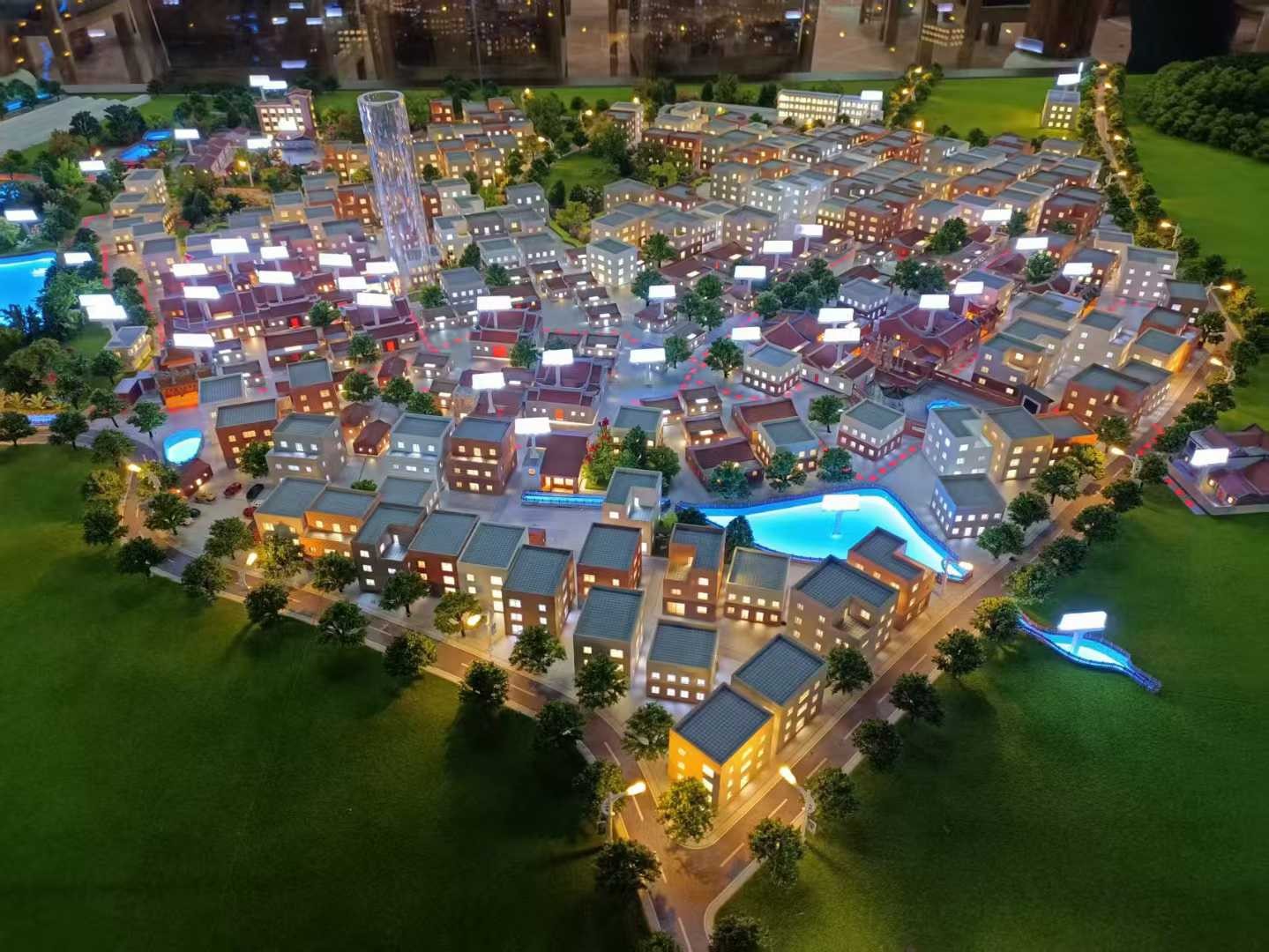
Let us break down what makes a model effective for infrastructure planning.
Transportation Network
Roads (arterials, collectors, locals), bridges, tunnels, traffic signals.
Distinct colors or line thicknesses.
Utility Networks
Water (blue), sewer (brown), storm drain (dark blue), gas (yellow), power (red), telecom (orange).
Color‑coded lines with diameter indicators.
Public Facilities
Schools, hospitals, police stations, fire stations, libraries, community centers, post offices.
Icons or numbered labels.
Emergency Response Zones
Fire station coverage radii, police patrol zones, ambulance response areas.
Shown as transparent overlays.
Capital Improvement Projects (CIP)
Projects scheduled for the next 1, 3, 5, 10 years.
Different colors or dashed lines for each timeframe.
Condition Assessment
Aging infrastructure highlighted (e.g., water mains >50 years old in orange).
Prioritized for replacement.
Phasing and Coordination
Areas where multiple projects overlap.
Shown as cross‑hatched zones.
Interactive Layers
Removable transparent overlays for each infrastructure type.
Engineers study one system at a time.
A well‑designed City Infrastructure Planning Sand Table Model answers: “What needs to be fixed, when, and how do we pay for it?”
Materials for Infrastructure Planning Models
Infrastructure models emphasize clarity, durability, and layering.
Laser‑cut MDF or acrylic – For building footprints.
Colored acrylic rods or painted lines – For utility networks.
Fine sand or textured paint – For ground.
Printed vinyl – For labels and CIP symbols.
Removable transparent vinyl overlays – For layering different systems.
Small acrylic disks – For manholes, valve chambers, fire hydrants.
LEDs – For highlighting CIP zones (optional).
Avoid decorative landscaping – focus on infrastructure legibility.
The Custom Production Process: Step by Step
How is a city infrastructure planning sand table model made?
Here is the typical workflow.
Step 1: Infrastructure Data Compilation
You provide GIS data, utility maps, CIP schedules, and facility locations.
The model maker identifies key systems and projects.
Step 2: Scale Selection
Common scales: 1:2,000 to 1:10,000.
1:2,000 for a dense downtown utility network.
1:5,000 for a district or small city.
Step 3: Base and Terrain
A reinforced MDF base is cut.
Topography sculpted for drainage analysis.
Step 4: Building and Road Context
Building footprints and road networks added as simple grey shapes.
Step 5: Utility Networks
Color‑coded lines for water, sewer, gas, power, and telecom.
Manholes and valve chambers marked.
Step 6: Public Facilities
Schools, hospitals, police/fire stations added as icons.
Step 7: CIP and Phasing
Projects scheduled for years 1‑3, 4‑6, 7‑10 in distinct colors or line styles.
Overlapping project zones cross‑hatched.
Step 8: Condition Assessment
Aging infrastructure highlighted (e.g., orange lines for water mains >50 years).
Step 9: Emergency Response Overlays
Fire station coverage radii added as transparent circles.
Step 10: Interactivity
Removable transparent overlays for each utility layer.
Engineers can isolate water or sewer for detailed review.
Step 11: Quality Control and Cover
The model is inspected for legibility.
A clear acrylic cover is recommended for dust protection.
A custom City Infrastructure Planning Sand Table Model typically takes 10 to 14 weeks.
Applications for Infrastructure Planning Models
Where are these models used?
Capital Improvement Program (CIP) Coordination
Align water, sewer, road, and power projects to avoid duplicate trenching.
Budget and Funding Presentations
Show council members which projects are most urgent.
Interdepartmental Meetings
Water, transportation, and public works teams plan together.
Emergency Response Planning
Identify areas with poor fire station coverage or aging water mains.
Public Communication
Show residents why a road needs to be closed for pipe replacement.
Integration with Other Planning Model Types
A Municipal Engineering Planning Sand Table Model focuses on underground utilities – your infrastructure model adds above‑ground facilities and CIP phasing.
Case Study: Infrastructure Model Saves $12M in Duplicate Trenching
A mid‑sized city planned $200M in infrastructure upgrades over five years.
Water, sewer, gas, and road projects were on separate schedules.
The public works department commissioned a City Infrastructure Planning Sand Table Model at 1:4,000 scale, covering a 2.5m x 2m table.
The model used color‑coded lines for each utility and dashed outlines for CIP projects by year.
During a coordination meeting, engineers saw that a water main replacement on Main Street was scheduled for year 2, while a gas line upgrade was scheduled for year 4 on the same block.
They combined the projects.
Duplicate trenching costs saved: estimated 38,000.
Cost Factors for Infrastructure Planning Models
Area covered – 20 sq km vs. 200 sq km.
Number of utility layers – 3 vs. 8.
CIP phasing detail – 3 phases vs. 10 phases.
Condition assessment – Basic vs. age‑coded lines.
Interactivity – Static vs. removable transparent overlays.
Typical range: 80,000 for a city‑wide model with full utility mapping, CIP phasing, and condition assessment.
How to Choose a Model Maker for Infrastructure Projects
Experience with utility or civil engineering models – Not just land use.
Understanding of color‑coding standards – APWA uniform colors.
Ability to show CIP phasing – Different line styles for different years.
References from public works departments – Call two.
Ask for a sample of how they represent a water main replacement project overlapping with a road resurfacing project.
Maintaining and Updating Your Infrastructure Model
Infrastructure networks change as projects are completed.
Use removable CIP overlays – Replace a year‑2 project with a “completed” status when done.
Replaceable condition stickers – Update aging pipe status as replacements occur.
Annual review – Compare to current CIP and asset management data.
Budget for updates – Every 1‑2 years for active CIP coordination.
For a Satellite Town Planning Sand Table Model that includes new infrastructure, the same modular layering approach works.
Display Tips for Public Works Use
In a Capital Planning Meeting Room
Large table with good overhead lighting.
Removable overlays allow teams to focus on one utility at a time.
For Council Presentations
Use a touch screen legend to toggle different CIP phases.
Highlight overlapping project zones.
In a Public Works Department
Keep the model accessible for daily coordination.
Use a clear acrylic cover to protect from dust.
Common Mistakes to Avoid
Do not use similar colors for different utilities.
Follow APWA color codes strictly.
Do not forget manholes and valve chambers.
Access points are critical for maintenance planning.
Do not ignore CIP phasing.
A model without project timelines is just a map.
Do not make lines too thin.
A 0.5mm line disappears on a physical model – use 1‑2mm.
Do not skip a legend.
Without a legend, no one knows which color represents which utility or CIP phase.
Integrating with Other Planning Model Types
An infrastructure model works alongside specialized models for different urban systems.
For a new community, a Satellite Town Planning Sand Table Model plans land use and jobs – your model shows the infrastructure that makes it function.
For green networks, an Urban Green Space Planning Scale Model adds parks and blue infrastructure – your model ensures utilities support those features.
For the economic core, a City Central Business District Sand Model focuses on buildings – your model shows the water, power, and transit that serve those towers.
For detailed underground coordination, a Municipal Engineering Planning Sand Table Modelzooms in on pipe networks – your model provides city‑wide CIP context.
For the big picture, a Regional Urban Planning Scale Model includes infrastructure corridors across municipalities – your model provides local project detail.
Each type serves a different purpose. The city infrastructure planning model is the coordination hub for capital improvements.
Future Trends in Infrastructure Sand Table Models
Live asset data – LEDs show real‑time water pressure or sewer flow.
Augmented reality – Scan a manhole to see CCTV inspection footage.
Modular CIP overlays – Swap out project phases as budgets change.
Predictive condition modeling – Highlight pipes likely to fail within 5 years.
Yet the core remains.
Engineers need to see conflicts and coordination opportunities.
A physical model does that best.
Conclusion
A City Infrastructure Planning Sand Table Model is an essential tool for coordinating capital projects, aligning departments, and communicating with the public.
It prevents costly conflicts, prioritizes aging assets, and builds support for funding.
Focus on utility color‑coding, CIP phasing, and condition assessment.
Add removable overlays for each infrastructure layer.
Update the model as projects are completed.
Whether you are a public works director, city engineer, or capital planner, invest in an infrastructure model.
Your projects will cost less.
Your city will function better.
And remember – whether you need a Satellite Town Planning Sand Table Model for new communities, an Urban Green Space Planning Scale Model for parks, a City Central Business District Sand Model for downtown, a Municipal Engineering Planning Sand Table Model for detailed utilities, or a Regional Urban Planning Scale Model for cross‑municipality corridors, each relies on solid infrastructure planning. The dedicated city infrastructure planning sand table model is where it all comes together.
Model your infrastructure. Build a resilient city.


