Modular Architectural Sand Table Model Design
Introduction
Architectural projects change.
Phases expand, designs evolve, new ideas emerge.
A fixed model cannot adapt.
You would need to rebuild from scratch.
The solution is a Modular Architectural Sand Table Model.
This guide explains modular design.
Benefits, techniques, and when to choose modular over fixed.
Let us begin.
What Is a Modular Architectural Sand Table Model?
It is a physical miniature built from interchangeable parts.
Buildings, trees, roads, and terrain elements can be removed, swapped, or repositioned.
A Modular Architectural Sand Table Model uses standardized connection points.
Magnets, slots, or Velcro hold components in place.
The base has a grid or indexing system.
Each module fits precisely in its intended location.
This design allows the model to evolve with your project.
Why Modular Design Matters
Fixed models become obsolete when your design changes.
A modular model lives on.
With a Modular Architectural Sand Table Model, you can:
Test different building placements.
Show future phases as white blocks, then replace with detailed models.
Reconfigure street patterns for traffic studies.
Remove sections for transport or storage.
For academic research, modularity allows hypothesis testing.
For developers, it supports multi‑phase marketing.
For urban planners, it enables scenario comparison.
Key Features of a Modular Sand Table Model
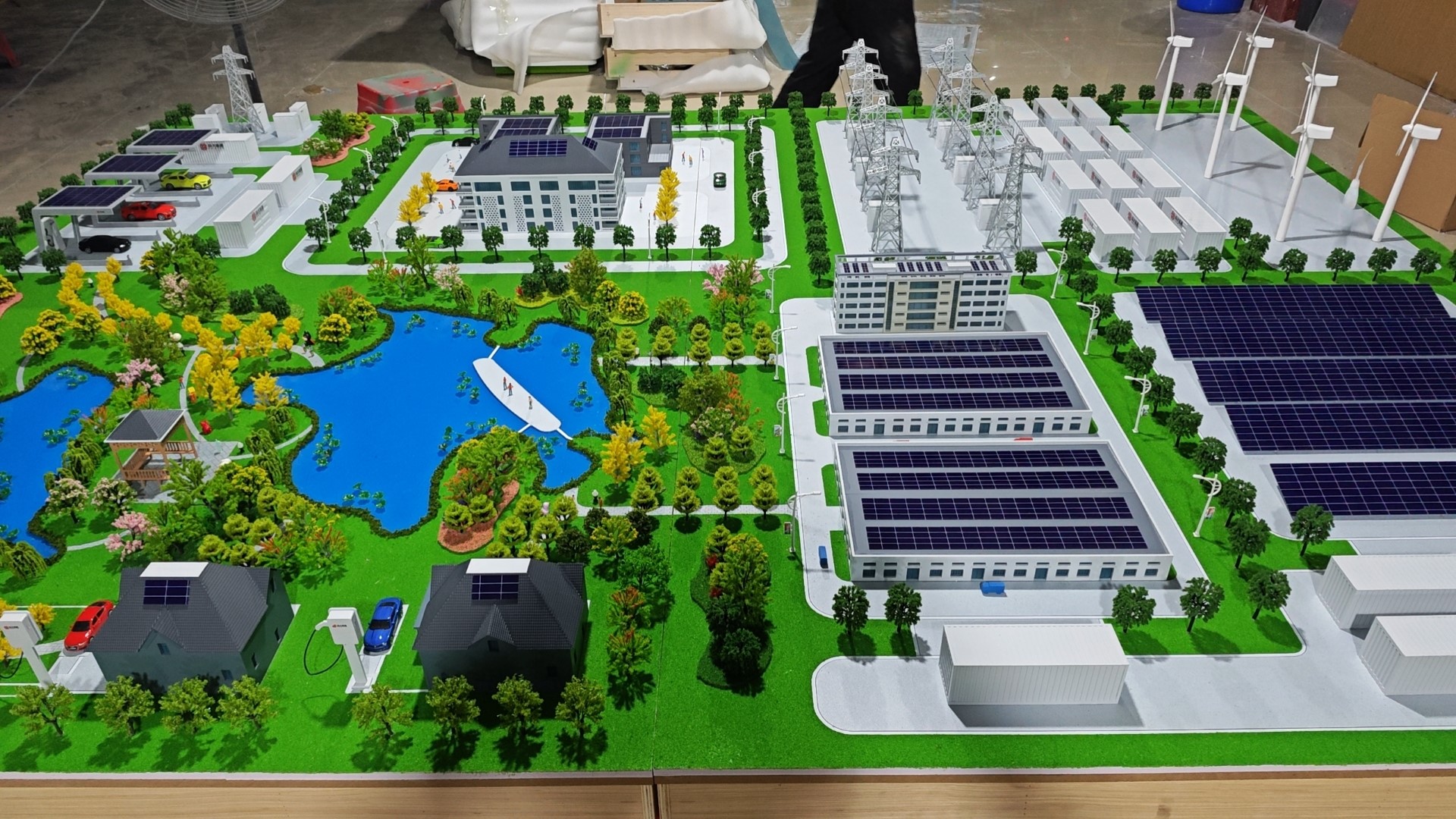
Let us break down what makes a model modular.
Standardized Base with Grid
A laser‑etched grid (e.g., 5cm squares) on the base.
Each square has a connection point (magnet, hole, or hook).
Interchangeable Building Blocks
Buildings have matching connectors on their bottom.
They snap or stick into place.
No glue – just friction or magnetism.
Modular Terrain Tiles
The ground is made of removable tiles.
Swap a grass tile for a water tile.
Change topography by replacing a hill tile.
Swappable Landscape Elements
Trees, streetlights, benches, and cars have small bases.
They plug into standard holes.
Labeling System
Each module is labeled with its ID.
A legend shows current configuration.
Storage Case with Compartments
Modules are stored in a foam‑lined case.
Easy to transport and reconfigure.
A well‑designed Modular Architectural Sand Table Model is a system, not a static object.
Materials for Modular Models
Modular models need durable, dimensionally stable materials.
High‑density MDF or acrylic – For base and large modules.
Neodymium magnets – For secure but removable connections.
Brass or steel pins – For slot‑and‑pin systems.
3D printed PLA – For lightweight building modules.
Laser‑cut acrylic – For terrain tiles.
Foam core with magnetic sheet – For inexpensive, lightweight modules.
Avoid permanent adhesives – everything must be reversible.
The Modular Design Process: Step by Step
How is a modular sand table model designed and built?
Here is the typical workflow.
Step 1: Define Module Sizes
Decide on a standard module footprint (e.g., 10cm x 10cm).
All buildings and terrain tiles follow this grid.
Step 2: Design the Base
A reinforced base with a grid and connection points.
Magnets embedded at each grid intersection.
Step 3: Create Terrain Tiles
Each tile has a top surface (sand, grass, water) and a bottom with magnets or pins.
Tiles are interchangeable.
Step 4: Fabricate Building Modules
Buildings are designed with hollow bases to house magnets.
Different building types have different colors or labels.
Step 5: Produce Landscape Elements
Trees, streetlights, and furniture have small magnet feet.
They can be placed anywhere on steel‑embedded tiles.
Step 6: Test and Adjust
Assemble a configuration.
Check that magnets hold securely but allow removal.
Adjust magnet strength if needed.
Step 7: Create Storage and Documentation
A labeled storage case.
A manual showing how to assemble different scenarios.
A custom Modular Architectural Sand Table Model typically takes 6 to 10 weeks.
Applications for Modular Sand Table Models
Where does modular design excel?
Multi‑Phase Real Estate Marketing
Show phase one today.
When phase two is released, swap in new buildings.
No need for a whole new model.
Academic Research and Experimentation
An Architectural Sand Model for Academic Research can be reconfigured for different tests.
Change building heights, tree density, or street patterns in minutes.
Urban Planning Scenario Testing
Test three different street layouts on the same base.
Swap terrain tiles to compare.
Design Studio Teaching
Students reconfigure the model for each project.
One model serves many semesters.
Premium Quality Presentations
A Premium Quality Architectural Sand Table Model can be modular without sacrificing beauty.
Hidden magnets preserve clean aesthetics.
Handmade Craftsmanship
A Handmade Architectural Building Scale Model with modular components requires precision, but the result is uniquely adaptable.
Low Carbon Building Studies
A Low Carbon Building Architectural Sand Table Model can be reconfigured to test solar access for different building orientations – modularity makes experiments efficient.
Smart City Prototyping
A Smart City Building Architectural Scale Model with modular sensor nodes allows researchers to test IoT placements physically.
Case Study: Modular Model Saves $50,000 in Remakes
A university urban planning lab needed a model of a downtown district.
The district plan changed every semester based on new student projects.
They commissioned a Modular Architectural Sand Table Model on a 2m x 2m base with 10cm grid modules.
Buildings, trees, and even road tiles were interchangeable.
Over five years, the model was reconfigured 30 times.
A fixed model would have needed 30 remakes – at an estimated $50,000.
The modular model cost $18,000.
It paid for itself many times over.
Cost Factors for Modular Models
Modular design adds complexity and cost upfront – but saves long‑term.
Number of modules – 50 vs. 500.
Connection system – Simple pins vs. embedded magnets.
Terrain tile variety – 3 tile types vs. 20.
Storage case – Basic box vs. custom foam‑lined case.
Typical range: 35,000 for a large, highly detailed system with dozens of building and terrain modules.
How to Choose a Maker for Modular Models
Portfolio of modular work – They should show interchangeable parts.
Understanding of connection systems – Magnets, pins, or slots.
Experience with documentation – A manual is essential.
References from academic or planning clients – Call two.
Ask for a demo of a modular component being removed and replaced.
Maintaining a Modular Model
Modular models need care to keep connections working.
Clean magnets regularly – Metal dust reduces hold.
Inspect for wear – Pins can loosen over time.
Replace damaged modules – Makers can reprint individual parts.
Store modules in labeled compartments – Prevents loss.
Common Mistakes to Avoid
Do not use weak magnets.
A building that falls off during a presentation is embarrassing.
Do not forget a storage case.
Loose modules get lost.
Do not make modules too small.
Tiny parts are hard to handle and easy to lose.
Do not ignore the grid.
Without a clear indexing system, reconfiguration is guesswork.
Do not over‑customize connection types.
One standard system (e.g., 5mm magnets) is better than multiple.
Future Trends in Modular Sand Table Models
Smart modules with RFID – The base reads which building is placed where.
Color‑coded LED grids – Lights show available slots or zoning colors.
3D printed on‑demand modules – Users download files and print new parts locally.
Magnetic levitation – Buildings float slightly above the base for dramatic effect.
Yet the core remains.
Modularity gives a model a second, third, and tenth life.
It is the sustainable choice.
Conclusion
A Modular Architectural Sand Table Model is an investment in flexibility.
It grows with your project, supports research, and saves money over time.
Choose a robust connection system.
Plan your module sizes carefully.
Invest in a good storage case.
Whether you need an Architectural Sand Model for Academic Research, a Premium Quality Architectural Sand Table Model, a Handmade Architectural Building Scale Model, a Low Carbon Building Architectural Sand Table Model, or a Smart City Building Architectural Scale Model, modular design can extend its usefulness for years.


